In short
- Delta Patcher is portable: download the .zip, extract it and run the program. The xdelta3 engine is built in, so there’s nothing else to install.
- Requirements: Windows 7 or later, macOS 11 Big Sur or later, or Linux through Flathub or the GTK 3 build.
- The Windows and macOS builds aren’t signed with a commercial developer certificate, so your system may ask you to confirm the first launch.
- On Linux, Flathub is the simplest option and the only one for ARM or older distributions.
System requirements
| System | Requirement | Architecture | Download |
|---|---|---|---|
| Windows | Windows 7 or later, plus the Microsoft Visual C++ 2015–2022 Redistributable (already present on most systems) | 64-bit (x86-64) or 32-bit (x86) | windows_bin_x86_64.zip or windows_bin_x86.zip |
| macOS | macOS 11 Big Sur or later | Universal: Apple silicon and Intel | macos11+_bin_universal.zip |
| Linux (.zip) | GTK 3 and glibc 2.38 or newer (for example Ubuntu 24.04, Fedora 39, Debian 13 or later) | x86-64 | linuxGTK3_bin_x86_64.zip |
| Linux (Flathub) | Any distribution with Flatpak | x86-64 or ARM64 | io.github.marco_calautti.DeltaPatcher |
The program itself is small: roughly 4–12 MB once extracted, depending on the platform. Patching large files needs free space for the output file, which ends up about the same size as the file you’re patching.
Install Delta Patcher on Windows
-
Download the Windows .zip
Get
windows_bin_x86_64.zipfrom the download page. Usewindows_bin_x86.ziponly if your Windows is 32-bit. Here’s how to check. -
Extract the files
Right-click the .zip and choose Extract All…, then pick a folder you’ll remember, such as
Documents\Tools\Delta Patcher. Extract first rather than running the program from inside the .zip, so it has a permanent home. -
Run DeltaPatcher.exe
Double-click
DeltaPatcher.exe. The main window opens in patch application mode, with Original file and XDelta patch fields. -
Get past SmartScreen if it appears
Because
DeltaPatcher.exeisn’t digitally signed, Microsoft Defender SmartScreen may show “Windows protected your PC.” If the file came from the official release (or its SHA-256 checksum matches), click More info, then Run anyway. -
Add a shortcut (optional)
Right-click
DeltaPatcher.exeand choose Pin to Start, or Show more options → Send to → Desktop (create shortcut).
Open .xdelta files with Delta Patcher
Delta Patcher accepts a patch file when it starts, so you can make it the default app for .xdelta files. Right-click any .xdelta file, choose Open with → Choose another app, browse to DeltaPatcher.exe, and select Always. Double-clicking a patch then opens Delta Patcher with that patch already in the XDelta patch field. You still pick the original file yourself.
If Windows says VCRUNTIME140.dll is missing
The Windows builds link against the Microsoft Visual C++ runtime (VCRUNTIME140.dll and MSVCP140.dll). That runtime ships with most systems because so many programs use it, but on a fresh or stripped-down Windows install it can be absent, and the program then refuses to start with a missing-DLL message.
The fix is to install Microsoft’s free Visual C++ Redistributable (opens external site), matching the build you downloaded: the x64 package for windows_bin_x86_64.zip, or the x86 package for windows_bin_x86.zip. Nothing else is required.
If your antivirus flags the program
Older Delta Patcher versions extracted a bundled xdelta executable at runtime, which some antivirus products treated as suspicious. Since version 3.0.0 the engine is compiled into the program, and the changelog notes the change was made to avoid those false positives. If your security software still objects:
- Confirm the file’s SHA-256 checksum matches the official value on the download page.
- If it matches, report a false positive to your antivirus vendor and add an exception for that file only.
- If it doesn’t match, delete the file and download it again from the official release.
There is more detail, including what the program does and doesn’t do on your system, in is Delta Patcher safe?
Install Delta Patcher on macOS
-
Download the macOS .zip
Get
macos11+_bin_universal.zipfrom the download page. The same app runs natively on Apple silicon and Intel Macs. Safari may unzip it for you automatically. -
Move the app to Applications
Double-click the .zip if it wasn’t extracted, then drag DeltaPatcher.app into your Applications folder. The app will run from anywhere, but Applications keeps it easy to find.
-
Open it for the first time
Double-click the app. Delta Patcher isn’t distributed through the App Store or notarized with an Apple Developer ID, so macOS will probably block the first launch with a message that it can’t verify the app. Click Done (or OK) and continue to the next step.
-
Allow it in Privacy & Security
Open System Settings → Privacy & Security, scroll to the Security section, and click Open Anyway next to the Delta Patcher message. Confirm, enter your password if asked, and the app opens. On macOS 11 and 12 the same button is in System Preferences → Security & Privacy → General. You only have to do this once.
If macOS says the app “is damaged and can’t be opened”
This message usually doesn’t mean the file is corrupt. macOS shows it for apps that carry the download quarantine flag but aren’t notarized. First confirm the .zip’s SHA-256 checksum matches the official value. Then remove the quarantine flag in Terminal:
xattr -dr com.apple.quarantine /Applications/DeltaPatcher.appOnly do this for apps you trust and have verified. It removes the check for that one app, not for your whole Mac.
Folder access prompts
If macOS asks whether Delta Patcher may access files in a folder such as Downloads, Documents or Desktop, click Allow. The program writes the patched file into the same folder as the original, so it needs permission to write there.
Using an older Mac
Version 3.1.6 needs macOS 11 or later. For Intel Macs on macOS 10.13–10.15, Delta Patcher 3.1.3 (opens external site) was the last release with a separate macos10.13+ build. It lacks the large-file support added in 3.1.5.
Install Delta Patcher on Linux
There are two options. Flathub works on nearly any distribution, handles updates and supports ARM64. The GTK 3 .zip is a single x86-64 binary for newer distributions.
Option 1: Flathub (recommended for most people)
If your software center already includes Flathub (common on Fedora, Linux Mint, Pop!_OS and others), search for Delta Patcher and click Install. From a terminal:
flatpak install flathub io.github.marco_calautti.DeltaPatcher
flatpak run io.github.marco_calautti.DeltaPatcher
No Flatpak yet? Follow the Flathub setup guide (opens external site) for your distribution first. The Flathub package can read and write your files normally, so no extra permissions are needed. Updates arrive with flatpak update.
Option 2: The GTK 3 .zip
Download linuxGTK3_bin_x86_64.zip from the download page, then extract and run it:
unzip linuxGTK3_bin_x86_64.zip -d ~/Apps/DeltaPatcher
cd ~/Apps/DeltaPatcher
chmod +x DeltaPatcher
./DeltaPatcher
The binary includes wxWidgets and xdelta3 but uses your system’s GTK 3 and C libraries. It needs glibc 2.38 or newer, which rules out Ubuntu 22.04, Debian 12 and older releases. Use Flathub on those.
| Error when starting | What it means | Fix |
|---|---|---|
libgtk-3.so.0: cannot open shared object file | GTK 3 isn’t installed | Debian 13 / Ubuntu 24.04+: sudo apt install libgtk-3-0t64Fedora: sudo dnf install gtk3Arch: sudo pacman -S gtk3 |
version `GLIBC_2.38' not found | Your distribution is older than the build | Install from Flathub instead |
Permission denied | The executable bit was lost during extraction | chmod +x DeltaPatcher |
cannot execute binary file | Your machine isn’t x86-64 (for example, ARM) | Install from Flathub, which provides ARM64 builds |
To add Delta Patcher to your application menu, save this as ~/.local/share/applications/deltapatcher.desktop, replacing both paths with the folder where you extracted it:
[Desktop Entry]
Type=Application
Name=Delta Patcher
Comment=Apply and create xdelta patches
Exec=/home/you/Apps/DeltaPatcher/DeltaPatcher %f
Path=/home/you/Apps/DeltaPatcher
Terminal=false
Categories=Utility;
Build from source (advanced)
Delta Patcher is open source and builds with CMake. You need a C++ compiler, CMake and Git, plus GTK 3 development files on Linux. On Ubuntu:
sudo apt install build-essential cmake git libgtk-3-dev
git clone --recurse-submodules https://github.com/marco-calautti/DeltaPatcher.git
cd DeltaPatcher
cmake -B build -DCMAKE_BUILD_TYPE=Release -DwxBUILD_SHARED=OFF
cmake --build build --config Release
The binary ends up in build/app/. Windows (Visual Studio) and macOS (Xcode command-line tools) builds follow the same steps with extra flags, which are documented in the project README (opens external site).
Check that it works
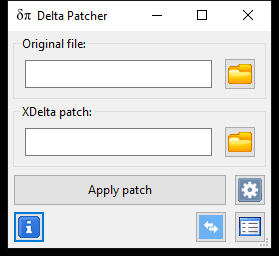
When Delta Patcher starts correctly, you’ll see a compact window with fields labeled Original file and XDelta patch, a wide Apply patch button with an options (gear) button beside it, and three small icon buttons along the bottom: About on the left, and switch mode and show/hide log on the right. That’s all you need. Continue with how to apply your first patch.
Updating Delta Patcher
Delta Patcher doesn’t update itself and doesn’t store settings, so updating is just a replacement:
- Windows and Linux (.zip): download the new .zip and replace the old program file.
- macOS: replace
DeltaPatcher.appin Applications with the new copy. You may need to approve the first launch again. - Flathub: run
flatpak updateor update from your software center.
The current version is 3.1.6. The download page lists what changed.
Uninstalling
Delete the folder that contains DeltaPatcher.exe, delete DeltaPatcher.app from Applications, or delete the Linux binary. Flathub users can run flatpak uninstall io.github.marco_calautti.DeltaPatcher. Your patched files aren’t affected.