XDelta patch support
Reads and writes the VCDIFF format used by xdelta3, including patches that use lzma, djw or fgk secondary compression.
Delta Patcher Guide & Download
Delta Patcher is a free, open-source desktop app for applying and creating XDelta patches. Choose your original file and a .xdelta patch, click Apply patch, and it rebuilds the modified file, with no command line and nothing else to install. This independent guide walks you through each step, from choosing the right download to fixing checksum errors.
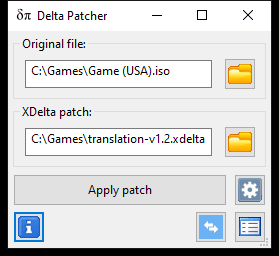
Illustration of Delta Patcher 3.1.6 with “Backup original file” enabled. Field names match the real program.
Official builds from the developer’s GitHub releases: portable .zip files with no installer and nothing bundled.
Always verify the required source file and patch version before applying a patch. The 32-bit Windows build and SHA-256 checksums are on the download page, and is Delta Patcher safe? explains the first-launch warnings.
The basics
Delta Patcher, often written as one word (deltapatcher), is a graphical XDelta patcher: a program for applying and creating delta patches without touching the command line. It’s developed by Marco Calautti and released as open source under the GPL-2.0 license. It does two jobs: applying a patch to a file you already have, and creating a patch that records the differences between two versions of a file.
An XDelta patch doesn’t contain a complete file. It holds instructions such as “copy this range of bytes from the original” and “add these new bytes here.” That’s why patches are usually small, and why each one only works with the exact original file it was made from.
Many XDelta tools are front-ends that run the separate xdelta3 command-line program. Delta Patcher builds the xdelta3 engine into the app instead, so it works on its own.
Features
Everything below is in the current release. None of it needs plugins, extra downloads or the command line.
Reads and writes the VCDIFF format used by xdelta3, including patches that use lzma, djw or fgk secondary compression.
Pick the original file and the patch, then click Apply patch. You can replace the original or keep it and write a separate patched copy.
Compare an original file with your modified version and save the differences as a .xdelta file, with an optional description for users.
Two fields and one button for applying, four for creating. Drag and drop works too, so you rarely need a file dialog.
On by default. xdelta3 checks each block of output as it’s rebuilt, so a wrong source file stops the patch instead of producing a broken file.
The xdelta3 3.1.0 library is built in. There’s no separate xdelta3 install, no runtime to add, and no installer to run.
Native builds for Windows 7 or later (64-bit and 32-bit), macOS 11 or later on Apple silicon and Intel, and Linux through GTK 3 or Flathub.
Set the compression level (0–9), secondary compression, source window size and whether checksums are written into the patch.
Use cases
Delta Patcher works on any file, byte by byte. It doesn’t know or care whether the file is a disc image, a document or a program. Some uses below are general capabilities; others are simply common in communities that share patches.
Capability something the software is built to doCommunity use a popular way people use it
Translation groups publish a small patch instead of a full translated game. Players apply it to their own copy of the original release.
Level edits, bug fixes and restorations are often shared as XDelta patches, especially for DS and disc-based games, where changes move data around inside the file.
XDelta handles CD and DVD images and other large files. Since version 3.1.5, Delta Patcher also works with files larger than 4 GB.
Ship an update as the difference between two versions of any file, so people download only what changed rather than the whole file again.
Create a patch between two builds of a data file or asset, and use the description field to tell users exactly which file it applies to.
Keep one untouched original and rebuild the modified version whenever you need it, from the original plus a patch that’s a fraction of the size.
How it works
Applying a patch takes five steps. Select a step to see what’s happening and why it matters.
Why it matters: the patch refers to exact byte positions in this file. A different revision, region or dump won’t line up, and the checksums inside the patch will stop the process.
If the author included a description, Delta Patcher shows it in a Patch info tooltip as soon as the patch loads. Read it: it often names the exact source file you need.
There’s no output picker. The result goes next to the original. With Backup original file ticked, your original stays and the result is saved as namePATCHED.ext. Otherwise, a successful patch replaces the original.
xdelta3 rebuilds the new file window by window and checks each window against the checksum stored in the patch. On a mismatch it stops and tells you the file you’re trying to patch isn’t the right one.
If the patch author published a checksum for the finished file, compare it with yours. A match confirms the patch was applied exactly as intended.
Original file + XDelta patch → patched file. Delta Patcher checks every window of output as it rebuilds the file.
Installation
Delta Patcher is a portable app: download a .zip, extract it and run the program. There’s no setup wizard, and removing it is as simple as deleting the file.
Windows 7 or later · 64-bit & 32-bit
The program isn’t code-signed, so SmartScreen may warn you the first time. Continue only if the file came from the official release.
macOS 11 Big Sur or later · Apple silicon & Intel
The app is distributed outside the App Store, so macOS may ask you to approve it on first launch.
Flathub (x86-64, ARM64) or GTK 3 .zip (x86-64)
./DeltaPatcher.The .zip build needs glibc 2.38 or newer. On older distributions, use the Flathub package.
Quick start
Here’s the short version of applying an XDelta patch. The full guide explains every option and what to do if something fails.
Get the official build for your system from the download page.
It opens in patch application mode, with Original file and XDelta patch fields.
Click the folder button next to Original file, or drag the file onto the window.
Click the folder button next to XDelta patch. If a Patch info tooltip appears, read it.
Open the options menu next to Apply patch and tick Backup original file to keep it. It’s off by default.
Click Apply patch and wait for “Patch successfully applied!”
Test the patched file, and compare its checksum if the author published one.
Patch creation
Switch Delta Patcher to patch creation mode and it compares two files: the untouched original and your modified version. The differences are written to a .xdelta file you can share. Anyone who uses the patch needs their own copy of the same original.
Troubleshooting
Most failed patches come down to one thing: the original file isn’t the exact one the patch expects. These are the messages people see most often.
The file you are trying to patch is not the right one.Your source file isn’t the file the patch was made from. The usual culprits are a different revision, region or dump.
How to fix itsource file too shortThe file is smaller than the patch expects. You may have picked the wrong file, or it may be trimmed or incomplete.
How to fix itnot a VCDIFF inputThe patch is damaged or incomplete, or it’s in another format such as IPS or BPS that needs a different tool.
How to fix itfile open failedThe output goes next to the original. If that folder is protected or read-only, move both files somewhere you can write to.
How to fix itGuides
Background reading for when you want to understand what’s happening, not just which button to click.
The XDelta format and xdelta3 tool in plain English, with a Delta Patcher vs command-line comparison.
Read guideWhat the .xdelta extension is, how to open one on any system, and why it needs your original file.
Read guideHow browser-based patchers work, what to check before using one, and when a desktop app is the better tool.
Read guidePick the right patcher for any ROM hack, and handle the file quirks of GBA, NDS, SNES, N64 and disc games.
Read guidePatch a .nds ROM with Delta Patcher, handle trimmed dumps, and load the result in an emulator or flashcart.
Read guideTwo ways to apply XDelta patches without a PC, plus how Delta Patcher differs from the Delta emulator.
Read guideWhat checksums are, and the commands to calculate CRC32, MD5, SHA-1 and SHA-256 on any system.
Read guideThe exact naming rule for output files, what happens to the original, and a safe folder workflow.
Read guideFAQ
Yes. Delta Patcher is free, open-source software released under the GNU General Public License v2.0. Its source code is public on GitHub (opens external site).
No. The xdelta3 engine is built into Delta Patcher (version 3.1.6 includes xdelta3 3.1.0), so the program works on its own.
Yes. There are builds for Windows 7 or later (64-bit and 32-bit), macOS 11 Big Sur or later on Apple silicon and Intel, and Linux through a GTK 3 build or Flathub. See the installation guide for each system.
In the same folder as the original file. By default it replaces the original. If you tick Backup original file, the original is kept and the result is saved with PATCHED added to its name. More on where the output goes.
Your original file isn’t the exact file the patch was made from. Check the patch’s readme for the required version and checksum, then compare it with your file.
Download the official Delta Patcher build for your system, then follow the step-by-step guide. If anything goes wrong, the troubleshooting guide covers every common error.